How Does a Strawberry Blonde Hair Filter Work, and Should You Try One in 2026?
 Johnathan Parker |
October 15, 2026 |
4:13 pm
Johnathan Parker |
October 15, 2026 |
4:13 pm
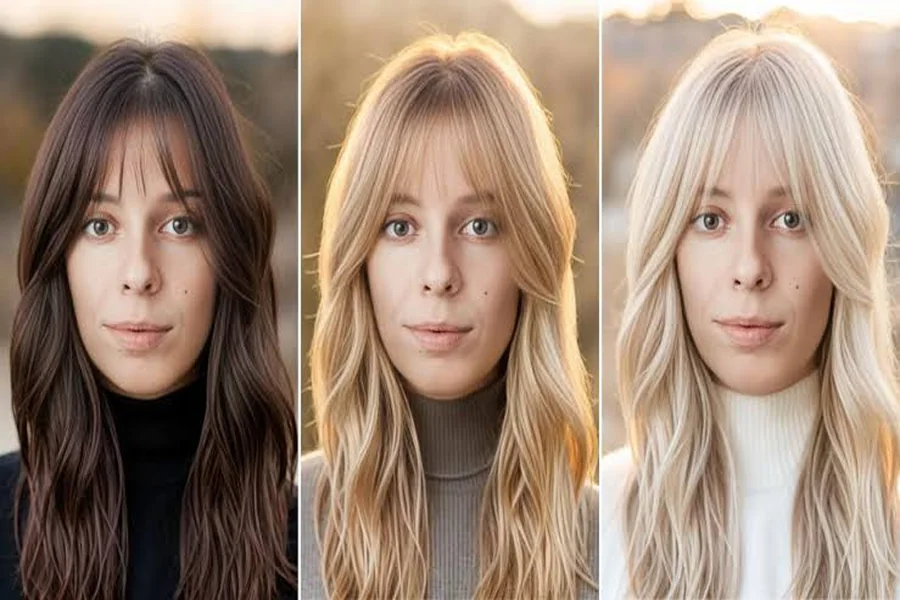
Strawberry blonde sits in a tricky spot on the color wheel. It is not quite red, not quite blonde, and it looks very different on warm and cool skin tones. That is exactly why so many people now test it virtually before booking a salon appointment. A strawberry blonde hair filter lets you see the shade on your own face in seconds, without bleach, toner, or regret.
In this article, we look at how these filters work, why AI hair color try-ons have become a social media habit, how to get a realistic preview, and what to keep in mind before turning a filter look into a real color.
What Is Strawberry Blonde, Exactly?
Strawberry blonde is a light blonde base with soft copper or rose-gold undertones. Natural versions are rare and usually appear alongside fair skin and freckles, but salon versions can be tailored to almost anyone.
Colorists often describe it in three broad families:
- Light strawberry blonde: mostly blonde with a gentle peach glow.
- Classic strawberry blonde: an even mix of golden and copper tones.
- Deep strawberry blonde: closer to light copper, with more red visible.
Because the balance between gold and red changes the whole effect, previewing it before committing makes a lot of sense.
How Do AI Hair Color Filters Actually Work?
Modern hair filters rely on computer vision rather than simple color overlays. When you upload a photo or turn on your camera, the software runs through several steps:
- Hair segmentation: a trained model detects which pixels belong to your hair, including flyaways and edges around the face.
- Color mapping: the chosen shade is applied to that mask while keeping the original light and shadow.
- Texture preservation: highlights, lowlights, and strand detail stay visible so the result does not look painted on.
- Blending: the edges are softened against skin and background for a natural finish.
This is the same family of technology behind background removers, portrait modes on iPhone and Pixel cameras, and AR effects on Snapchat and TikTok.
Where Can You Try the Look Online?
You do not need a special app for a quick preview. Browser-based editors now handle hair recoloring directly from an uploaded selfie. For example, CapCut offers a free strawberry blonde hair filter that applies the shade to your photo online, which is handy if you want to compare a few versions side by side before saving the one you like.
Other options people use include in-app effects on TikTok and Instagram, YouCam Makeup, and virtual try-on tools from hair dye brands such as L’Oréal and Garnier.
Why Are Virtual Hair Try-Ons So Popular?
There are a few clear reasons this trend keeps growing:
- Cost: a salon color correction can be expensive, so testing first saves money.
- Hair health: fewer impulsive bleach sessions mean less damage.
- Content creation: “I tried a new hair color” posts perform well on TikTok, Reels, and YouTube Shorts.
- Confidence: seeing yourself in a new shade helps you explain what you want to a stylist.
For many people, the filter has become a normal part of the decision process, much like trying glasses on virtually before ordering them. Stylists have noticed the shift too, and many now ask clients to bring filtered selfies to consultations because a picture of the client’s own face communicates tone far better than a celebrity photo.
Tips for a More Realistic Preview
A filter is only as good as the photo you feed it. To get a preview that actually resembles real life:
- Use natural daylight facing a window, not yellow indoor bulbs.
- Keep your hair visible and away from busy backgrounds.
- Avoid beauty filters that smooth or recolor your skin at the same time.
- Test several photos with your hair up, down, and in different lighting.
- Compare with your makeup routine, since strawberry tones pair differently with warm or cool lipstick and blush.
Which Skin Tones Suit Strawberry Blonde?
Strawberry blonde is more flexible than its reputation suggests, but tone matching still matters.
| Skin undertone | Shade that usually works | Why |
| Warm (golden, peachy) | Classic or deep strawberry blonde | Copper echoes the warmth in the skin |
| Cool (pink, rosy) | Light strawberry blonde with beige base | Softer red avoids extra flush |
| Neutral | Most versions | Balanced undertones handle both gold and copper |
| Olive | Deep strawberry blonde | Richer tones avoid looking washed out |
A virtual preview is a fast way to check these general rules against your own features.
From Filter to Salon: What to Know Before You Dye
A filter shows the destination, not the journey. Before you book, keep these points in mind:
- Starting color matters. Dark brown hair usually needs lightening first, which can take more than one session.
- Maintenance is real. Copper and red pigments fade faster, so color-safe shampoo and gloss treatments help.
- Bring screenshots. Show your stylist the filtered photo plus a few real-life reference images.
- Ask about a strand test to see how your hair takes the color.
It also helps to understand the limits of the technology. Filters cannot predict how porous or previously colored hair will absorb pigment, and they tend to make color look perfectly even from root to tip. Real hair rarely behaves that way, especially if it has old box dye or sun-lightened ends. Screens also differ: the same shade can look warmer on an iPhone and cooler on an Android display, so check the preview on more than one device.
Treat the filtered image as a conversation starter, not a guarantee.
Conclusion
A strawberry blonde hair filter is a low-risk way to explore one of the most flattering but unpredictable hair colors. AI segmentation and smart color mapping now make these previews surprisingly realistic, especially when you use a clear photo taken in natural light.
Use the filter to narrow down the shade that suits your skin tone, save a few comparisons, and take them to a professional colorist. That way, the version you see on screen has a much better chance of becoming the version you see in the mirror.