What Does a CAD CAM Scanner Actually Do in a Modern Dental Practice?
 Johnathan Parker |
October 21, 2026 |
5:07 pm
Johnathan Parker |
October 21, 2026 |
5:07 pm
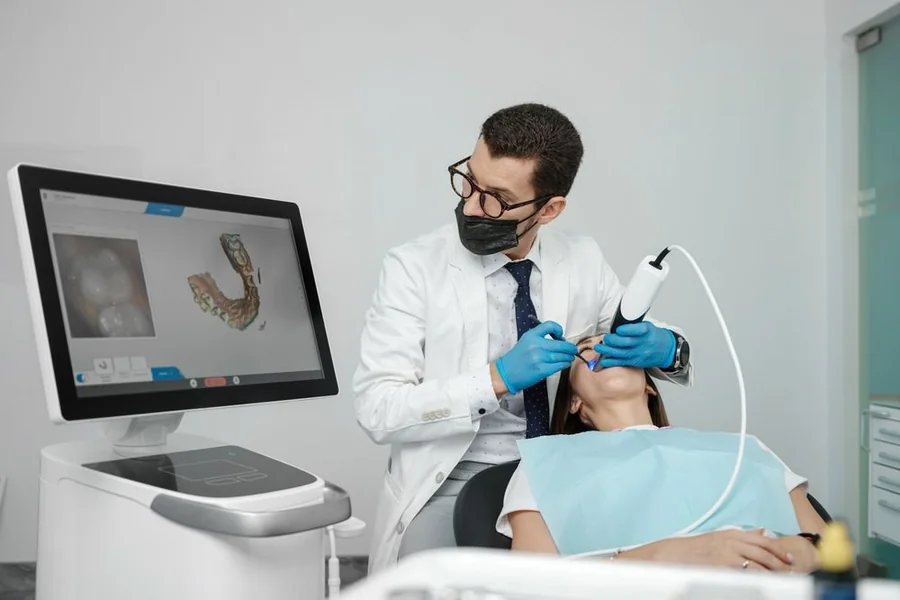
A digital workflow depends on the quality of the information entered at the outset. Before a crown can be designed, an implant can be planned, or an appliance can be fabricated, the practice needs an accurate record of the teeth, bite, and surrounding anatomy.
A CAD CAM scanner takes care of this first step. In a clinical setting, it captures a three-dimensional digital model directly from the patient’s mouth and displays it on screen. If part of the margin is missing or an area does not look quite right, the clinician can rescan that section while the patient is still in the chair.
Once the scan is complete, the file can go straight into CAD software, to a dental lab, or into workflows for implants, aligners, nightguards, and other appliances. There is less back-and-forth, and the next person working on the case starts with digital data they can use right away.
Below is a clear look at what the device does day to day, where it saves time, and how to decide whether it suits a given operatory or lab bench.
H2: From Impression Tray to Digital Scan
For decades, capturing an accurate copy of a patient’s teeth meant loading impression material into a tray, seating it in the mouth, waiting for it to set, and then sending the physical impression to the lab.
Both PVS and alginate depend on a physical impression that must capture the needed anatomy correctly on the first attempt. If part of the impression is incomplete, another impression may be needed.
An intraoral scanner changes the capture step altogether.
H3: What the Scanner Records
Instead of impression material, a small wand moves across the teeth while the software creates the digital model on screen. The clinician can capture a preparation, quadrant, opposing arch, full arch, and bite relationship depending on the case.
For a restorative case, the scanner records the surface geometry the software or lab needs to evaluate the preparation and surrounding teeth. It captures the detail needed to identify the margin, understand proximal relationships, and establish occlusion from upper and lower scans.
Many scanners also capture full-color images. Some systems go further and provide shade measurement tools or attach shade information to the digital case, although the exact capability varies by scanner and software package.
H3: Patient-Side Gains
For many patients, a scanning wand is easier to tolerate than a tray filled with impression material. It can be especially helpful for patients with a sensitive gag reflex or those who simply dislike having a bulky tray in their mouth.
H2: How the Scan Turns Into a Restoration
Once the model is complete, the dental CAD/CAM workflow follows three clear stages: scan, design, and produce.
First, the scan file opens in CAD software. There, the clinician or technician sets the margin line, adjusts proximal contacts, and refines the occlusion against the opposing arch. The software proposes a restoration shape, and the operator fine-tunes it.
Chairside Versus Lab Path
Once the files are complete, you can take one of two routes.
The chairside CAD/CAM path sends the design to an in-office mill or 3D printer, producing a restoration in a single visit. It supports same-day crowns with a cad cam scanner and spares the patient a second appointment and a temporary.
The other route exports the file to a dental laboratory. The lab takes care of design, milling, or printing, then returns the finished piece.
A clean digital file gives the lab a sharper starting point than a poured stone model, which trims remakes and back-and-forth calls. The split lets a practice scale digital work without buying every machine at once.
H2: Where a Scanner Earns Its Keep Beyond Crowns
While crowns get the most attention, the scanner reaches far wider. Treating it as a single-purpose crown tool undersells what the data can do across a practice.
- Bridges, inlays, onlays, and veneers all start from the same digital capture.
- Clear aligner cases use full-arch scans to plan tooth movement and print models.
- Night guards and occlusal splints come straight from stored scans, sized to the patient’s real bite.
H3: Digital Records That Keep Working
Every scan becomes a saved file. The archive lets a practice track wear over months, compare arches over time, and monitor a cracked tooth before it fails. If a patient loses a night guard, a stored scan allows quick re-fabrication with no new appointment for another impression.
H3: Feeding Implant and Surgical Planning
Implants call for a clear view of the gumline. Surface scans pair with cone beam CT data for implant planning.
The scan supplies the exact tooth and tissue surface, while the CBCT shows bone and nerve position. Together they support guided surgery, where a printed surgical guide directs drill angle and depth. The link turns the dental CAD/CAM workflow into a planning tool.
H2: Where a Scanner Earns Its Keep Beyond Crowns
Crowns tend to get most of the attention, but an intraoral scanner can support a much wider range of cases.
Bridges, inlays, onlays, and veneers can begin from the same digital capture. Full-arch scans can also support clear aligner cases, while nightguards and occlusal splints can be designed from stored patient data.
H3: Digital Records That Keep Working
Every scan becomes a saved file. The archive lets a practice track wear over months, compare arches over time, and monitor a cracked tooth before it fails. If a patient loses a night guard, a stored scan allows fast re-fabrication with no new appointment for another impression.
H3: Feeding Implant and Surgical Planning
In implant workflows, surface scans can also be combined with CBCT data when the systems support it.
The surface scan provides detailed information about the teeth and soft-tissue surface. At the same time, CBCT imaging provides information about bone and other anatomical structures.
Together, those datasets can support implant planning and surgical guide design.
H2: Intraoral vs. Desktop Scanners and What Fits Your Practice
Two scanner types serve different spots in the workflow. An intraoral scanner captures directly in the mouth, chairside. A desktop scanner sits in the lab and scans physical models, dies, or impressions in high detail.
| Factor | Intraoral Scanner | Desktop Scanner |
| Primary use | Chairside capture in the mouth | Lab-side scanning of models and impressions |
| Speed per case | Fast direct capture, no pour | Requires a physical model first |
| Best fit | Dentists doing same-day or referral scans | Labs and in-house model work |
| Detail on complex cases | Strong for most restorations | Very high for full articulated cases |
For most general practices moving away from physical impressions, an intraoral scanner is the more logical starting point. A desktop scanner becomes more relevant as the practice builds a larger in-house lab operation or needs to digitize physical work regularly.
H3: Look Past Scan Speed
The fastest scanner on a specification sheet is not automatically the scanner that will save your practice the most time.
Look at what happens after the scan. Can you send files easily to your existing lab? Does the scanner connect with the CAD software, aligner platform, implant-planning program, or mill you expect to use? Are standard file formats available, or does the workflow keep the case inside one manufacturer’s ecosystem?
Hardware is important, too. Wireless scanners can make moving between operatories easier, while corded systems remove battery management from the equation. Neither is automatically better for every office.
Finally, figure out how much training your staff is willing to commit to. A scanner may start building a model as soon as the wand enters the mouth, but learning a repeatable scan path, managing tissue and moisture, capturing posterior areas, recording the bite correctly, and spotting incomplete data still take practice.
Frequently Asked Questions
Q: How long do CAD/CAM crowns last?
Well-fitted CAD/CAM crowns can last many years. Longevity depends on material choice, bite forces, and home care, much like traditional crowns. A precise digital fit helps reduce the marginal gaps that shorten crown life.
Q: How accurate are digital impressions compared to traditional ones?
For single units and short spans, digital impressions match or beat conventional ones in fit. They also skip distortion from material shrinkage and pour errors. Very long full-arch spans still demand careful scan technique for best results.
Q: Do I need milling and printing in-house to use a CAD CAM scanner?
No. A scanner works fine on its own by sending files to a lab. In-house milling or printing simply adds the same-day option. Many practices start scan-only, then add production later.
Q: How long does it take to learn to scan well?
Most clinicians scan competently within a few weeks of regular use. Simple cases feel natural within days. Hands-on coaching shortens the curve, especially for full-arch and deep margin scans.
H2: The Scanner Is Where the Digital Workflow Starts
A CAD CAM scanner turns the patient’s mouth into usable digital data. The same scanner that replaces an impression tray for a crown can also send an aligner case, capture an implant scan, contribute to guided-surgery planning, create records for future comparison, or feed an in-house CAD/CAM workflow.
The better buying question is not simply, “Which scanner scans fastest?” Look at what you want to do after the scan, which systems you need to connect with, and how much support your team will have while learning the workflow.
Once you get those pieces right, the scanner can become the starting point for a digital process your team can use across far more of the practice.
Talk with the dentist-founded team at CAD-Ray to compare intraoral and desktop scanners based on the cases you perform, the software you already use, and where you want your digital workflow to go next. Book a demo or training session to get started.