How to Safely Download Apps on Your Smartphone?
 Johnathan Parker |
December 1, 2025 |
11:47 am
Johnathan Parker |
December 1, 2025 |
11:47 am
Downloading apps on your smartphone can enhance its functionality, providing access to everything from entertainment to productivity tools. However, not all app sources are reliable, and some might expose you to security risks, including malware or data theft. Ensuring the safety of the apps you download requires caution and knowledge. By following the right steps and using trusted sources, you can enjoy your favorite apps without compromising your device’s security. This guide will provide practical advice on how to safely download apps and recognize potential risks associated with malicious apps.
Why is It Important to Download Apps Safely?
Downloading apps safely is crucial to protect your smartphone from security threats and ensure your personal data remains private. Malicious apps can infiltrate your device, stealing sensitive information such as passwords, banking details, or personal photos. These harmful apps can also lead to your smartphone being infected with viruses or malware that can damage your system, slow down performance, or cause it to crash. Additionally, some apps may exploit vulnerabilities in your operating system. By downloading only from trusted sources and following safety practices, you safeguard your phone against these dangers, ensuring that your digital experience remains secure and smooth.
How to Identify Safe Sources for App Downloads?
Official App Stores: HUAWEI AppGallery
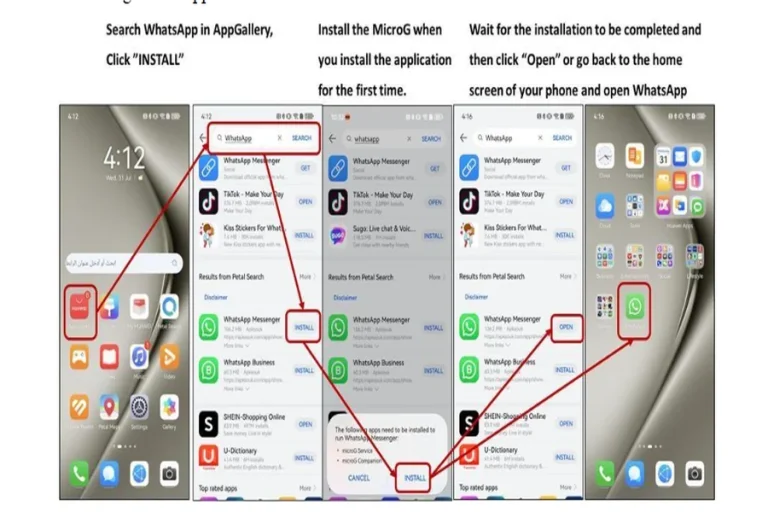
When it comes to downloading apps, the safest option is to use official app stores, such as the HUAWEI AppGallery. These platforms have strict security measures in place to vet apps before they are made available for download. The AppGallery scans apps for potential malware and other harmful elements, ensuring that users have access to a secure environment. By downloading apps only from trusted stores like the AppGallery, you minimize the risk of encountering malicious software or unauthorized apps that could harm your device.
The Importance of Checking Developer Information
Before downloading an app, always check the developer information to ensure it comes from a reputable source. Verified developers typically provide more reliable and secure apps, and their contact details or website may offer additional insights into their credibility. If the developer is unknown or lacks transparency, the app could be risky. Additionally, well-established developers often update their apps regularly to fix bugs and improve security, further reducing the chances of vulnerabilities. Always choose apps from trusted and verified developers to avoid exposing your smartphone to unnecessary risks.
Reading App Permissions Before Downloading
Reading app permissions is a critical step to ensure an app is safe to download. Apps typically request permissions to access certain features of your phone, such as the camera, microphone, contacts, or location. While some permissions are necessary for functionality, others may be excessive or intrusive. For example, a flashlight app shouldn’t require access to your contacts or location. Be cautious if an app asks for unnecessary permissions. Always scrutinize the permissions requested, and if they seem irrelevant to the app’s function, it’s best to avoid downloading it to protect your privacy. You can check guides on how to use Netflix on huawei safely to ensure a secure streaming experience.

What Are the Best Practices for Safe App Downloads?
Always Update Your Smartphone’s Operating System
Keeping your smartphone’s operating system (OS) up to date is one of the best ways to ensure safe app downloads. Software updates often include critical security patches that protect your phone from newly discovered vulnerabilities. Outdated OS versions can leave your device exposed to cyber threats, making it easier for malicious apps to exploit weaknesses. Regularly check for OS updates and install them promptly to maintain the security of your device. A well-maintained OS helps create a strong foundation for safe app downloads and enhances your overall smartphone experience.
Use Antivirus Software for Extra Protection
Installing antivirus software on your smartphone can provide an additional layer of protection against harmful apps. Antivirus apps scan downloaded apps for potential threats such as malware, spyware, or viruses. They can also alert you if an app behaves suspiciously after installation. Many antivirus programs come with real-time protection, scanning files and links before they are opened. With the growing number of mobile threats, having antivirus software installed ensures that even if you unknowingly download a risky app, your phone will be protected from potential damage or data loss.
Review User Ratings and Reviews
Before downloading an app, always check the user ratings and reviews. These provide valuable insights into the app’s functionality and security. Apps with low ratings or numerous negative reviews may indicate problems such as crashes, excessive ads, or security risks. Conversely, highly rated apps with positive feedback from a large number of users are typically safer to download. Pay attention to comments about the app’s performance, security features, and any unusual behavior. User reviews are a great way to learn from the experiences of others and avoid potentially harmful apps.
How to Spot Potentially Harmful Apps?
Warning Signs of Malicious Apps
Malicious apps often exhibit specific warning signs that can help you identify them before downloading. These include unusually high permissions requests, excessive ads, frequent crashes, or apps that ask for unnecessary access to your device’s features. Apps that don’t provide developer contact information or have no clear description of their function should also raise concerns. Additionally, if an app asks for sensitive information like credit card details or login credentials without a clear reason, it could be a phishing attempt. Always stay vigilant for these red flags to avoid installing malicious apps.
How to Check for Red Flags Before Installing
Before installing an app, check for potential red flags that may indicate it’s unsafe. One of the first things to verify is the app’s ratings and reviews. A lack of feedback or overly generic reviews may suggest that the app is untrustworthy. Next, examine the app’s permissions and ensure they align with its intended function. Apps that request excessive permissions should be avoided. Also, ensure that the app comes from a reputable developer, and search for any online mentions of its reliability or security. Thorough research helps you spot potential threats before installation.
What to Do if You Download a Suspicious App
If you download a suspicious app, act quickly to minimize potential damage. First, uninstall the app immediately. If it has already caused issues, such as unusual battery drain or data usage, run a security scan with antivirus software. It’s also a good idea to check your device’s permissions and revoke any access the app may have had. If you suspect that personal information has been compromised, change your passwords and monitor your accounts for unusual activity. Reporting the app to the official app store can help prevent others from downloading it.
Conclusion
Downloading apps safely is essential for protecting your smartphone from security threats and maintaining your privacy. By following best practices such as using trusted app stores, reading developer information and app permissions, and keeping your phone’s software up to date, you can reduce the risk of downloading harmful apps. Additionally, using antivirus software and reviewing user feedback can offer an extra layer of protection. Always stay vigilant for warning signs of malicious apps, and take immediate action if you suspect an app is unsafe. Safe app downloading ensures a secure and enjoyable smartphone experience.